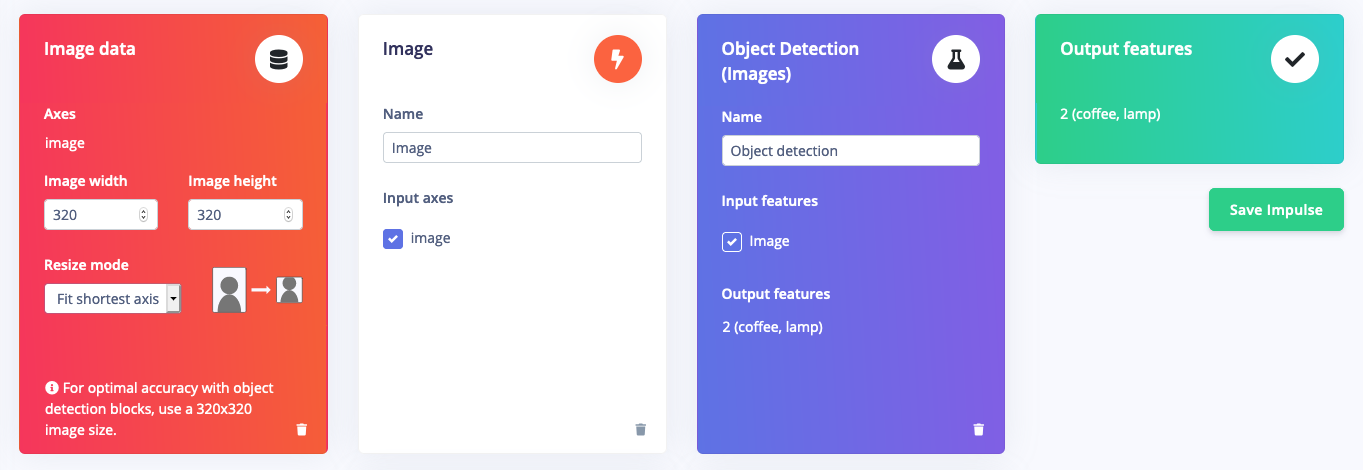
After collecting data for your project, you can now create your Impulse. A complete Impulse will consist of 3 main building blocks: an input block, a processing block and a learning block. A project can contain multiple impulses, also known as experiments.The Impulse view is one of the most important as an impulse represents the machine learning pipeline that will be packaged in one of the deployments and run on your edge device. Example impulses are shown below.Impulse example for motion classification and anomaly detection (multi-model) using accelerometer data:
Impulse example for motion classification using multi-label sample accelerometer data:
Impulse example for object detection using images:
The Input axes field lists all the axis referenced from your training dataset.
The Window size field is the amount of raw data from your sample that is used to generate features for model training.
The Window increase field is used to determine the starting point for the next window.
The Frequency (Hz) field is automatically calculated based on your training samples. Changing this value will downsample or upsample the raw data.
The Zero-pad data field adds zero values when there is not enough raw data to fit the window size.
If your project contains multi-label samples, there will be another field.
The Handling multi-label samples field allows you to configure which label is used for your window when it contains multiple labels.
Use label at end of window: Sets the window label to the label of the last data point in the window.
Use label X if anywhere present in window: Sets the window label to one of the selected label values if that label is found anywhere within the window. If multiple selected labels are found within the window, the selected label that is found the most within the window is used. If no checked labels are found within the window, the label at the end of the window is used.
Below is a sketch to summarize the role of window size and increase.
A processing block is basically a feature extractor. It consists of DSP (Digital Signal Processing) operations that are used to extract features that our model learns on. These operations vary depending on the type of data used in your project.You don’t have much experience with DSP? No problem, Edge Impulse usually uses a star to indicate the most recommended processing block based on your input data as shown in the image below.
In the case where the available processing blocks aren’t suitable for your application, you can build your own custom processing blocks and import into your project.